Let me be real with you for a second.Freelancing sounds like freedom — you set your own hours, pick your clients, and work in your pajamas if you want. But if you’ve been doing this for more than three months, you already know the truth: freelancing can be organized chaos.You’ve got client emails piling up, spreadsheets that don’t make sense, ad campaigns you barely understand, and a Notion workspace that looks like a digital junkyard. Sound familiar?That’s exactly why choosing the right productivity apps for freelancers isn’t just a nice-to-have — it’s survival. The freelancers who thrive in 2026 aren’t working harder. They’re working with better tools.
In this article, we’re breaking down the best apps and strategies that help you manage client projects, automate your Excel work with AI, handle e-commerce operations, and run paid ads without losing your mind. Whether you’re based in Lagos, London, Los Angeles, or Lyon — this one’s for you.
The right productivity apps for freelancers can completely transform how you work.
Why Freelancers Burn Out Without the Right Tools
Here’s something nobody tells you at the start: the problem isn’t usually the work — it’s the chaos around it.
A graphic designer loses 2 hours chasing a client for feedback. A copywriter spends 45 minutes rebuilding a report in Excel that AI could generate in 30 seconds. A digital marketer forgets to follow up on a proposal because their “system” is a sticky note on a monitor.
These small losses compound. And before you know it, you’re exhausted — not from doing great work, but from managing the mess around it.
The right productivity apps for freelancers fix this. They create structure, reduce decision fatigue, and give you back time to actually grow your business.
1. How to Use Notion for Client Projects (And Actually Stick With It)
Notion is one of the most powerful productivity apps for freelancers managing multiple clients.
If you’ve tried Notion and abandoned it within a week, you’re not alone. Most people set it up wrong and get overwhelmed.
But here’s what changes everything: you don’t need to build a complex system. You need a simple one that works.
Set Up a Client Hub in Notion
Think of Notion as your freelance command center. Here’s a simple structure that works for most freelancers:
Client Database — Name, status (active/inactive), contract value, deadline
Project Pages — One page per project with tasks, files, notes, and timelines
Weekly Review Page — What got done, what’s pending, what needs attention
This alone will transform how you manage your client work. No more digging through emails to remember what was agreed. No more forgetting deadlines.
Notion Templates That Save Hours
You don’t have to build from scratch. Notion has a built-in template gallery with freelance project templates. Sites like Notioneverything.com also offer premium templates built specifically for freelancers and solopreneurs.
💡 Pro Tip: Create a “Client Onboarding” template in Notion. Every time you land a new client, duplicate it and fill in the details. This alone saves 30 to 45 minutes per new project.
This video walks you through setting up Notion from scratch as a freelancer — client tracker, project pages, and all.
How to Use Notion for Freelancers — Full Setup Tutorial
2. ChatGPT for Excel Automation — This Changes Everything
ChatGPT for Excel automation formula generation screenshot
Using ChatGPT for Excel automation is one of the smartest moves a freelancer can make in 2026.
If you’re still manually building spreadsheets, calculating formulas from scratch, or copying data between cells like it’s 2009 — this section is going to feel like discovering fire.
ChatGPT for Excel automation is one of the most underused power moves in freelancing right now.
What Can ChatGPT Actually Do in Excel?
A lot more than most people think. Here are real use cases:
Generate complex formulas — Just describe what you want. “Write a formula that calculates monthly revenue minus expenses and shows percentage profit.” Done.
Build data cleaning scripts — ChatGPT can write VBA macros or Python scripts to clean messy data automatically.
Create dynamic dashboards — Ask it to guide you step-by-step through building charts and pivot tables.
Automate repetitive tasks — Things like sending email reports, formatting invoices, or filtering client lists.
Describe your Excel problem clearly (paste the column headers if needed)
Ask for the exact formula or step-by-step instructions
Copy, paste, and adapt in your spreadsheet
For example, you can say: “I have a spreadsheet with client names in column A, invoice amounts in column B, and payment dates in column C. Write me a formula that flags invoices unpaid after 30 days.”
ChatGPT will give you something useful almost instantly. That used to take 20 minutes of Googling.
Watch: ChatGPT for Excel Automation Tutorial
See exactly how to use ChatGPT to generate Excel formulas, clean data, and automate your workflow in real time.
ChatGPT for Excel — Automate Your Spreadsheets with AI
3. E-Commerce Store Management Skills Every Freelancer Needs
If you freelance in e-commerce — whether as a VA, store manager, copywriter, or ads specialist — there are core e-commerce store management skills that instantly make you more valuable and more billable.
The Skills That Pay in 2026
Here’s what clients are actually paying for right now:
Product listing optimization — Writing titles, descriptions, and tags that rank on Amazon, Etsy, and Shopify
Inventory management — Knowing how to use tools like Oberlo, DSers, or Inventory Planner
Customer service workflows — Setting up Gorgias or Freshdesk to handle support without losing your sanity
Order fulfillment tracking — Understanding how to read shipping dashboards and flag issues early
Analytics interpretation — Reading Shopify analytics, Google Analytics 4, and Meta Pixel data
Even if you’re just starting out, mastering two or three of these skills puts you ahead of 80% of e-commerce freelancers applying for the same jobs.
4. Paid Ads Management for Small Business — What Freelancers Must Know
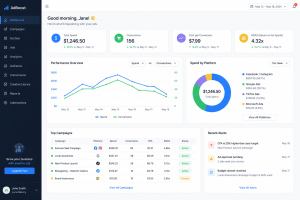
paid ads management for small business dashboard exampleUnderstanding paid ads management for small business clients is one of the highest-paying freelance skills in 2026.
Running paid ads management for small business clients is one of the highest-paying freelance services in 2026. But it also has the steepest learning curve — and the most room for costly mistakes.
Here’s what you need to understand before you touch a client’s ad budget.
The Basics You Cannot Skip
Budget allocation — Most small businesses start with $10 to $50 per day. Your job is to stretch that as far as possible.
Audience targeting — Know the difference between cold audiences, warm audiences (website visitors), and hot audiences (past buyers). Each needs a different type of ad.
Ad copy and creative — The image or video is responsible for 70 to 80% of ad performance. Copy closes the deal. Both matter.
Tracking and attribution — Without proper pixel setup and UTM parameters, you’re flying blind. Learn to set these up correctly before you spend a single dollar.
Reporting — Clients want to see results in plain English. Build a simple weekly report that shows spend, clicks, leads, and cost per result.
Best Platforms for Small Business Ads
Platform
Best For
Meta Ads (Facebook/Instagram)
Brand awareness, lead generation, retargeting
Google Ads
High-intent buyers actively searching
TikTok Ads
Younger audiences, viral products
Pinterest Ads
Lifestyle, home decor, fashion niches
A good resource to study is Google’s Skillshop — it’s free and gives you a solid foundation in Google Ads before you experiment with client money.
Watch: Paid Ads for Small Business — Beginner’s Guide
https://youtu.be/fSbqaTlWaYI?si=91xxZd9d9X_omxb5
This video breaks down how to set up, run, and optimize paid ads for small business clients — even if you’re starting from zero.
Paid Ads for Small Business — Complete Beginner’s Guide 2026
5. The Productivity Stack: Best Apps That Tie It All Together
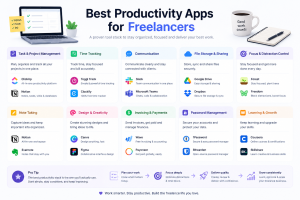
best productivity apps for freelancers tool stack layoutThe best productivity apps for freelancers work together as one powerful system.
You don’t need 50 apps. You need a tight stack that covers the essentials. Here’s what works.
Communication and Project Management
Notion — Client projects, notes, and planning
Slack — Team or client communication
Trello — Visual task boards if Notion feels like too much
Time Tracking and Invoicing
Toggl Track — toggl.com/track — Free tier is more than enough for most freelancers
Wave — Free invoicing and accounting, loved by freelancers in Nigeria, UK, and Canada
FreshBooks — More powerful, great for those billing $3,000 or more per month
Automation and AI
ChatGPT — Writing, Excel, brainstorming, and client emails
Zapier — Connects your apps and automates repetitive workflows
Make (formerly Integromat) — More powerful automation for advanced users
File Management and Collaboration
Google Drive — Reliable, free, and universally understood
Dropbox — Better for large media files if you work in design or video
Watch: Best Productivity Apps for Freelancers in 2026
A solid rundown of the top tools freelancers are using right now to stay organized, save time, and close more clients.
Best Productivity Apps for Freelancers in 2026
🎁 Get a Free Notion Client Project Template
This is the exact Notion setup used to manage multiple clients without dropping the ball on anything. Drop your email below and we’ll send it straight to you.
Freelancing is one of the most rewarding career paths in the world right now — but only if you run it like a business. And every real business has systems.
Whether it’s using Notion to organize your client projects, letting ChatGPT handle your Excel formulas, building e-commerce management skills that clients pay premium rates for, or finally understanding paid ads management well enough to get real results — the tools and knowledge are all here.
You don’t need to implement everything at once. Pick one thing from this article. Set it up today. Get comfortable. Then add the next piece.
That’s how the most productive freelancers build their systems — not all at once, but one solid block at a time.
💬 What’s the number one productivity tool you swear by as a freelancer? Drop it in the comments below — I’d love to see what’s working for others in the community.
If this article helped you, share it with another freelancer who’s still doing things the hard way. They’ll thank you for it. 🙌
Don’t miss our upcoming post on building a 6-figure freelance business with AI tools — subscribe to get notified the moment it goes live.